Use case · Sales & support

Customer operations — from lead to ticket

Qualify leads, prepare account briefs, generate follow-up tasks, classify tickets and detect SLA risks — so customer work moves faster and nothing falls through.

Leads followed upContext readySLA risks flagged
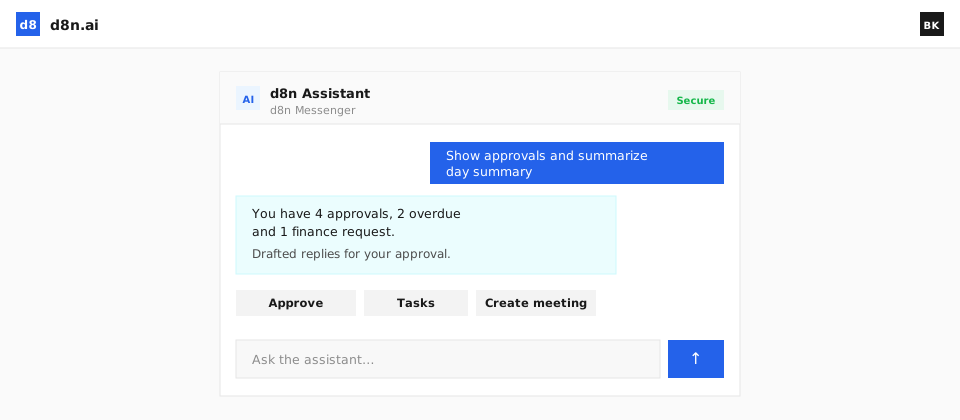
an account brief and a support ticket with an SLA-risk flag
Problem

Where inefficiency shows up

Leads slip

Inbound interest goes unqualified and unanswered.

Reps lack context

Account history is scattered, so every call starts cold.

SLA risks unseen

Tickets breach service levels before anyone notices.

Capabilities

What d8n does

Customer-facing work — sales and support — runs with context, follow-up and SLA awareness.

Lead qualification

Inbound leads captured and qualified against your criteria.

Account research

Account briefs prepared from history and external data.

Follow-up tasks

Next steps generated so nothing is forgotten.

Ticket classification

Support tickets classified and routed.

SLA risk detection

At-risk tickets surfaced before they breach.

Knowledge answers

Answers drafted from your knowledge base.

Demo

See how d8n Sales runs this process

A short demo: the agent runs a real process inside d8n — from request to result.

Result

Before → after

Before

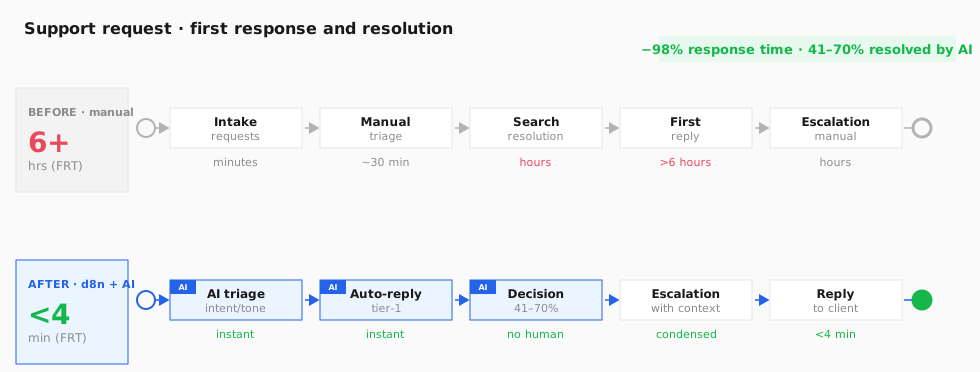
First response — more than 6 hours

A request is received, prioritised by hand, a solution is searched for and a reply sent — the average first response takes over 6 hours, and complex cases escalate for hours more. Leads are the same: the average reply takes around 42 hours, while a 5-minute window sharply raises the chance of qualifying.

After · with d8n and AI agents

A reply in under 4 minutes, AI resolves 41–70%

The Support agent instantly detects the topic, sentiment and language of a request, answers routine questions itself (41–70% resolved with no human), and hands complex ones to an operator with ready context. For leads — an instant reply inside the 5-minute window.

BPMN process diagram: stages and time before and after AI agents
Process stages and time per stage. Steps run by the d8n AI agent are marked in blue.
First response6+ hours<4 minutes
AI resolves (tier-1)0%41–70%
Lead reply~42 hoursinstant

Agent data sources: Helpdesk / ticketing system, CRM, knowledge base / FAQ, AI agent (LLM + RAG over the knowledge base), intent and sentiment classifier, routing and escalation, lead routing.

Benchmark sources: Twig — FRT >6 h → <4 min · eesel AI — 41.2% median deflection · MIT/InsideSales — Lead Response (5 min = ×21)

Agents working together

A ticket and a lead are run by several agents

Sales and support are served by different agents: a lead gets an instant reply, a routine request is resolved with no human, a complex one goes to an operator with context, and the manager sees SLAs automatically.

1

Lead: instant qualification

As soon as an enquiry arrives, the Sales agent researches the company and contact, enriches the data from the CRM and external sources, assesses the potential and prepares a brief for the manager. The instant reply lands inside the 5-minute window that sharply raises the chance of qualifying.

Sales — research & brief
Lead → Sales (enrich from CRM · assess · brief) → instant reply in the 5-min window → to the manager
2

Ticket: triage and tier-1 reply

The Support agent instantly detects the topic, tone and language of a request, finds the answer in the knowledge base (RAG) and resolves routine questions itself — 41–70% of tickets close with no human. The reply takes seconds instead of hours.

Support — triage & reply
Request → Support (intent · tone · knowledge-base search) → tier-1 auto-reply (41–70% resolved)
3

Escalation of complex cases

If a question is non-standard or sensitive, the agent hands it to an operator with ready context: the customer's history, the issue, the materials found and a proposed solution. The operator doesn't re-gather context and replies faster.

Support — contextOperator — solution
Complex request → Support (context · history · draft solution) → operator → reply to the customer
4

SLA and pipeline reports

The agent compiles reports on response time, the share resolved by AI, SLA breaches and pipeline health — shows them in chat on request or sends them to managers automatically on a schedule.

Reporting — SLA & pipeline
Tickets & deals → agent compiles metrics (FRT · deflection · SLA · pipeline) → report on request · OR auto-sent on a schedule
Process

How it works

1

Lead or ticket

A new lead or support request arrives.

2

Context assembled

The agent gathers history and prepares a brief.

3

Routed with next steps

It’s routed with follow-up tasks generated.

4

SLA & outcome tracked

Service levels are watched and outcomes logged.

AI agent: The Sales agent qualifies leads and briefs accounts; the Support agent classifies tickets and watches SLAs.

FAQ

Are the Sales and Support agents available now?

These agents are rolling out next; the underlying CRM and ITSM processes and the rest of the platform are available today.

Does it connect to our CRM and helpdesk?

Yes — d8n integrates with your existing tools, or runs the processes natively.

How are SLAs handled?

At-risk tickets are surfaced before they breach, with escalation.

Where does customer data live?

Inside your perimeter, permission-aware and audited.

Trusted by
Ministry of Internal AffairsHalyk BankJusan BankKASEKazpostKazatompromTengizchevroilAstana HubAtamekenOtbasy BankSamruk-KazynaBeeline

Move customer work faster

See lead qualification, account briefs and SLA-aware support in one place

Get a demo