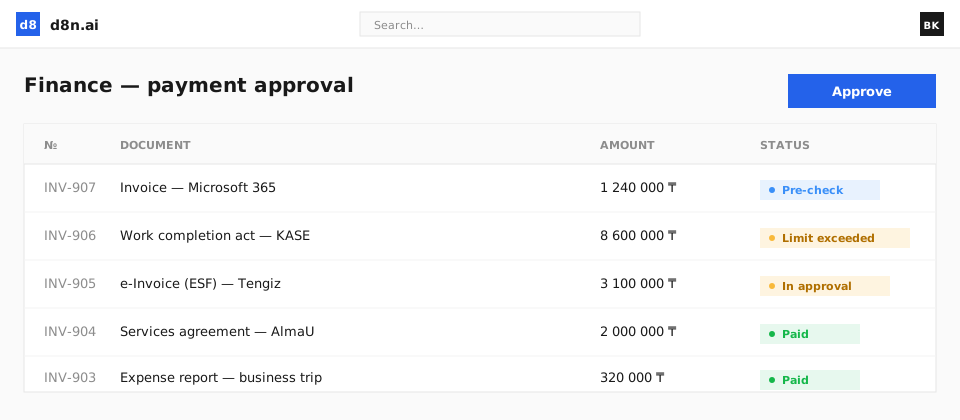
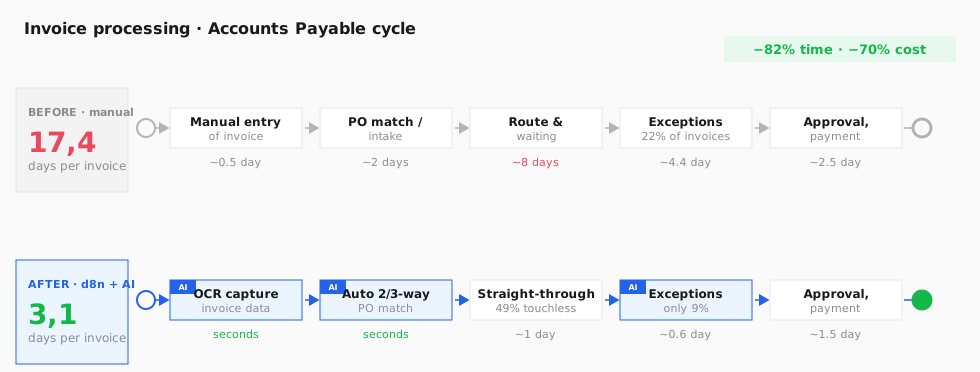
The financial document moves through specialised agents: capture, control, approval and reporting. Most checks run in parallel.
1
Receipt and capture of the invoice
The invoice arrives by email, is uploaded or comes from the e-invoicing system. The Finance agent reads the document (OCR/IDP), extracts the supplier, amount, VAT, number and date, matches the supplier against master data and registers the invoice. Manual keying is eliminated.
Finance — OCR/IDPRecords — registration
Invoice (email / e-invoicing) → Finance (OCR · extract details · match supplier) → registration
2
Parallel payment control
in parallel The Finance agent runs the 2/3-way match against the order and receipt; at the same time Legal checks the underlying contract and terms, and the Budget agent verifies the line-item limit. Matched invoices clear with no human touch; only exceptions go for review.
Finance — 2/3-way matchLegal — contractBudget — limit
Invoice → Finance (2/3-way match) ∥ Legal (underlying contract) ∥ Budget (limit) → matches auto · exceptions to a person
3
Approval and payment
The payment request is routed by amount to the right approver on a maker-checker basis; after a person confirms, the agent prepares the payment order and passes it to the banking module. Every action is fully audited.
Finance — routing by amountRecords — payment order
Request → route by amount (maker-checker) → human confirmation → payment order → bank
4
Reporting and budget control
The agent compiles reports on payments, exceptions, accounts payable and budget execution — shows them in chat on request ("how much we paid suppliers this week") or sends them to the CFO automatically on a schedule.
Finance / Reporting
Payments & budget → agent compiles metrics → report on request · OR auto-sent to the CFO on a schedule