Use case · Contracts

Review and approve contracts faster, with less risk

Check contract risk against your playbook, compare terms, summarise the document, route approvals and send it to signature — without the email ping-pong.

Faster reviewConsistent termsRouted to signature
a contract with risk flags against the playbook and the approval route
Problem

Where inefficiency shows up

Slow legal review

Contracts queue for manual reading, delaying every deal.

Inconsistent terms

Without a playbook in the loop, risky clauses slip through.

Lost in email approvals

Sign-off scatters across threads with no clear status.

Capabilities

What d8n does

From received draft to signed original, the contract stays controlled and visible.

Risk review

The agent checks the contract against your playbook and flags deviations.

Clause comparison

Compare versions and standard positions side by side.

Plain-language summary

Get a clear summary of what the contract actually says.

Approval routing

Sign-off follows the right route with clear status.

Route to e-signature

Send to signature inside d8n — to anyone, by email.

Version & audit

Every version and decision is kept and auditable.

Demo

See how d8n Legal runs this process

A short demo: the agent runs a real process inside d8n — from request to result.

Result

Before → after

Before

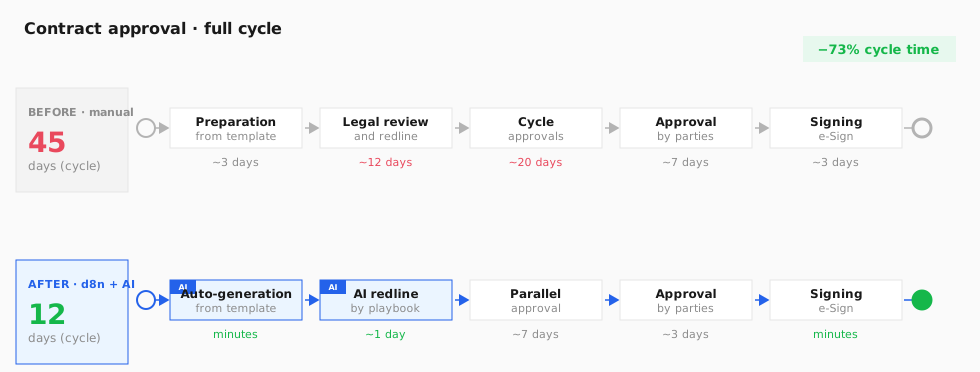
A 30–90 day contract cycle

A contract is drafted from a template, a lawyer reviews and redlines it by hand, the document travels between parties for approval, then sign-off and signature. 70–80% of edits are routine, yet each round takes days. A typical commercial cycle runs from one month to three.

After · with d8n and AI agents

A cycle of about 12 days

The Legal agent generates the contract from a template, checks it against your playbook and proposes edits in hours rather than days; approvals run in parallel with auto-reminders, and signing uses a digital signature. The lawyer focuses on the non-standard risks.

BPMN process diagram: stages and time before and after AI agents
Process stages and time per stage. Steps run by the d8n AI agent are marked in blue.
Contract cycle45 days12 days
Legal reviewdayshours
Routine editsmanualAI by playbook

Agent data sources: CLM platform, template repository and clause library, playbook of standard positions, NLP review engine, eSignature, obligation metadata, CRM/ERP.

Benchmark sources: Gainfront — 45→12 days · Malbek × WorldCC — playbook 70–80% · Sirion — AI redlining (−45…90%)

Agents working together

Several agents handle the contract — at every stage

From creation to obligation tracking, the contract is passed between specialised agents. Some checks run in parallel, so the cycle shrinks and risk stays under control.

1

Create and register the contract

The contract is created from an approved template or received from a counterparty as an incoming document. The Assistant fills in party details, subject and amount from the CRM, and Records registers the document and opens a card with number, type and deadline. It then enters the review route.

Assistant — draft from templateRecords — registration
Template / incoming → Assistant (details from CRM) → Records (registration · card) → into review
2

Parallel review

in parallel

The registered contract is analysed by three agents at once: Legal checks it against the playbook and flags legal risks, Finance verifies amounts, terms and payment conditions, and Registry checks formatting and details. All edits are collected into one list and the lawyer approves the decisions.

Legal — risksFinance — amounts & paymentRegistry — formatting
Contract → Legal (playbook) ∥ Finance (amounts/payment) ∥ Registry (formatting) → consolidated edit list → lawyer's decision
3

Approval and digital signing

After edits, the contract follows a role-based approval route with auto-reminders; Legal does a final review of the changes, then the document is signed with a digital signature and sent to the counterparty. Every step is logged with full audit.

Legal — final reviewRecords — route & dispatch
Edits → approval route (roles · reminders) → Legal (final review) → digital signature → sent to counterparty
4

Obligation tracking and reports

After signing, the agent tracks deadlines, obligations and renewal dates across the whole contract portfolio, reminds owners of key dates in advance and produces reports — on request in chat ("which contracts expire this month") or automatically on a schedule.

Legal / Reporting — obligation tracking
Signed contracts → monitor deadlines & obligations → remind owners → report on request · OR auto-sent on a schedule
Process

How it works

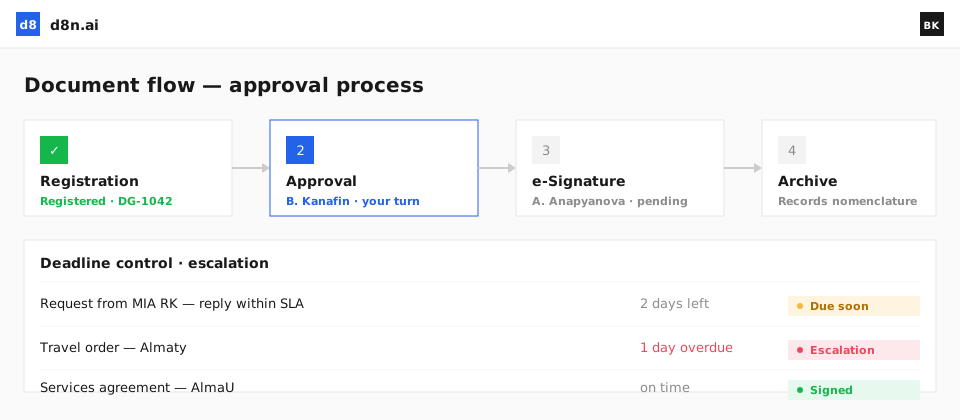
1

Received

A draft arrives or is created from a template.

2

AI risk review

The agent checks it against your playbook and summarises it.

3

Approvals routed

Sign-off follows the right route with status.

4

Signed & filed

It’s sent to signature, then filed with full history.

AI agent: The Legal agent reviews contracts, flags risks against your playbook and prepares summaries for sign-off.

FAQ

Does this replace our lawyers?

No. It speeds review and flags risk, but a person makes the call — the agent prepares, people decide.

Can it use our own playbook?

Yes. The Legal agent checks contracts against your standard positions and clause library.

Can we send to signature?

Yes — route the approved contract to eSignature and send it to any counterparty by email.

Where are signed contracts stored?

In your private contour, versioned and auditable, with on-premise options.

Trusted by
Ministry of Internal AffairsHalyk BankJusan BankKASEKazpostKazatompromTengizchevroilAstana HubAtamekenOtbasy BankSamruk-KazynaBeeline

Get to signed, faster

See contract review, approval and signature in one governed flow.

Get a demo