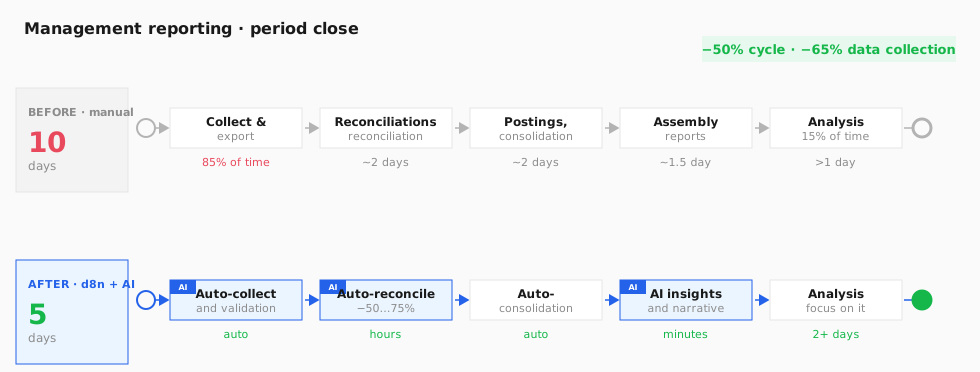
Reporting runs through a pipeline of agents: data collection, reconciliation, narrative and delivery. Most of the work is automatic; the person gets a finished result.
1
Data collection and validation
in parallel The Reporting agent connects to the ERP, CRM, bank and sub-ledgers and collects the needed metrics; in parallel, Finance validates the key figures, checks completeness and flags discrepancies. This removes the 85% of manual work that used to go into spreadsheet exports.
Reporting — collectionFinance — validation
ERP · CRM · bank · sub-ledgers → Reporting (collect) ∥ Finance (validate · completeness) → a verified dataset
2
Reconciliation and consolidation
The agent runs reconciliations between ledgers, posts recurring journal entries and consolidates data across departments and entities. Discrepancies that need a decision are surfaced to a person as a separate list.
Finance — reconciliation & consolidation
Data → auto-reconciliation → recurring entries → consolidation → discrepancy list to a person
3
Narrative and insights
The Executive agent turns the figures into a briefing a leader can read: key plan-vs-actual variances, trends, risks and recommendations. The team spends its time not on gathering but on interpretation and decisions.
Executive — narrative & insights
Consolidated data → Executive (variances · trends · risks) → finished briefing with insights
4
Delivery and alerts
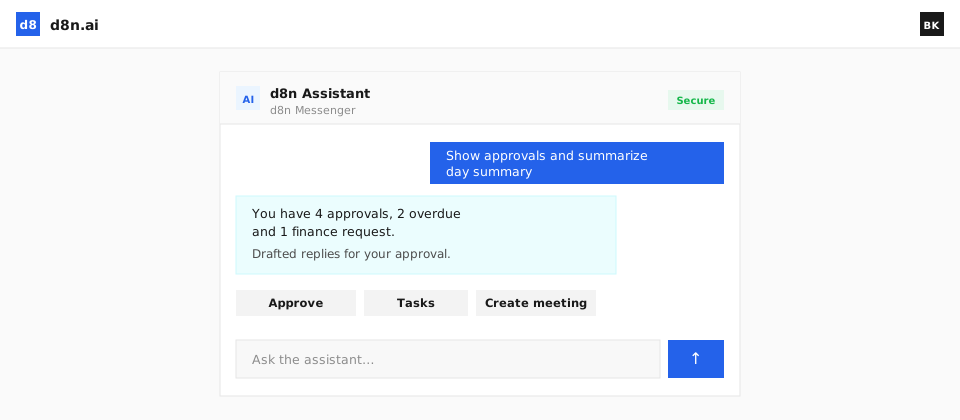
The leader gets the briefing in chat on request ("the week's results") or automatically on a schedule — every Monday morning. The agent also sends alerts on anomalies: a spike in costs, a dip in a metric, a risk of overrunning the budget.
Reporting / Executive — delivery
Briefing → chat on request · OR auto-sent on a schedule + alerts on anomalies